StackUp
The Browser Workspace
A minimalist canvas tab page where you can organize shortcuts, write notes, search history & open tabs, and sync seamlessly with Google Drive.
Welcome to your workspace!
- • Press ⌘+Shift+F
- • Right-click any link to save
- • Enable Google Drive Sync
Welcome to your workspace!
- • Press ⌘+Shift+F
- • Right-click any link to save
- • Enable Google Drive Sync
One-Click Extension Saving
Click the StackUp extension icon in your Chrome toolbar to instantly bookmark and organize current tabs into your workspace with zero friction.

Right-Click to Add Shortcuts
Save any web page or link instantly while browsing. Simply right-click anywhere on a webpage to add it directly into your StackUp workspace without interrupting your workflow.
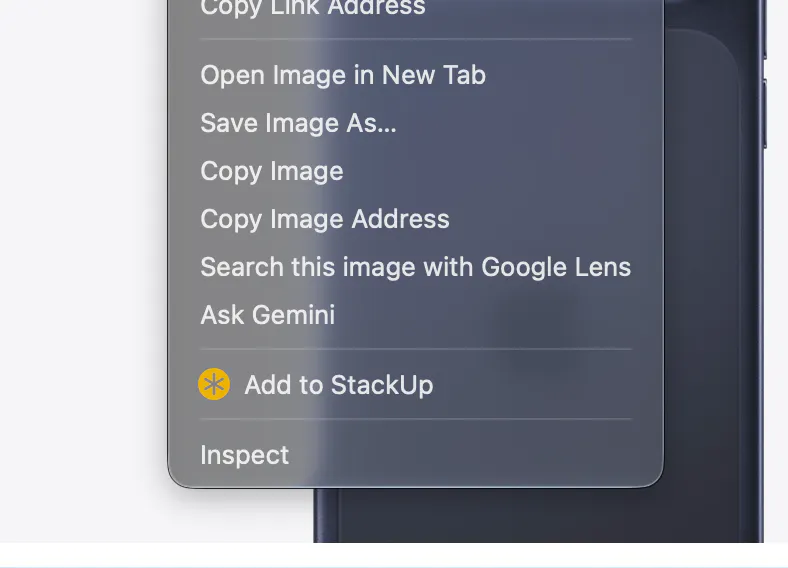
Create Quick Notes in Your Stack
Write down thoughts, reminders, or code snippets that stack seamlessly alongside your shortcuts directly on your workspace canvas.

Key Features & Capabilities
Everything you need to keep your browser organized, fast, and clutter-free.
Vertical Stacking
Create, add & manage shortcuts that stack cleanly from bottom to top on your workspace canvas.
Integrated Notes
Create simple, quick notes placed right alongside your shortcuts stack for easy reference.
Group Organization
Organize shortcuts and notes into clean, labeled custom groups.
Unified Search
Instant search bar across all your browsing history, notes, shortcuts, and open tabs.
Google Drive Sync
Seamlessly backup and sync your entire workspace across all your devices.
Frequently Asked Questions
Everything you need to know about setting up, customizing, and using StackUp.